Your sales team closes a deal. Someone enters the details into the CRM. Another person copies the same information into the invoicing system, while someone else adds the customer to the email platform.
The same data gets entered three times. Each handoff creates another chance for delays, missing details, or mistakes.
CRM integration helps prevent that. It connects the systems your team already uses so relevant customer information can move between them with less manual work.
This guide explains how CRM integration works, which tools to connect first, the available integration methods, and what to consider before getting started.
What Is CRM Integration?
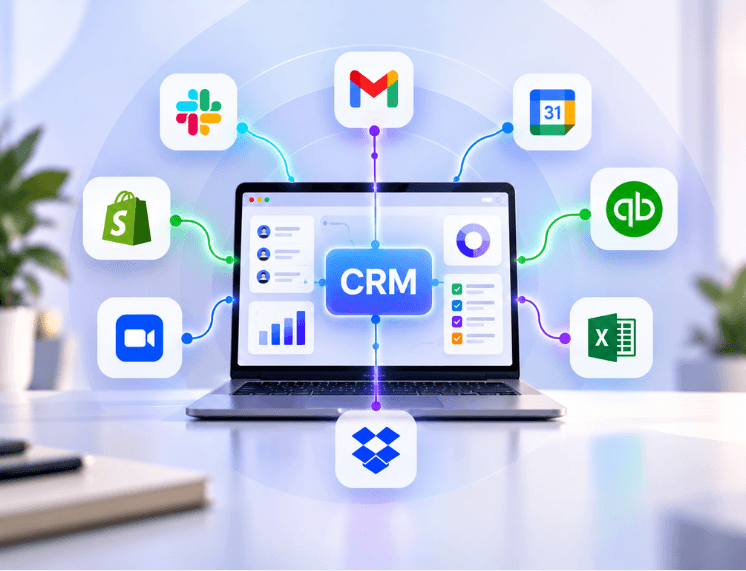
CRM integration connects customer relationship management software with other business tools, such as email, accounting, marketing, and customer support platforms. It allows relevant data to move between systems automatically or through defined workflows.
A customer relationship management (CRM) system stores information about your leads and customers. This may include contact details, sales opportunities, emails, calls, meeting notes, and purchase history.
Most businesses use other software alongside their CRM. Finance may manage invoices in an accounting platform. Marketing may run campaigns through an email service, while customer support may handle requests in a ticketing system.
These connections allow different tools to share information. Depending on the setup, an event in one system can trigger an update or action in another.
For example:
A prospect submits a form on your website.
Their contact details are added to the CRM.
The CRM assigns the lead to the appropriate salesperson.
When the deal is marked as won, the accounting system receives the information needed to prepare an invoice.
The customer is added to the relevant onboarding or email workflow.
The exact steps depend on the tools and rules your business uses. The goal is to reduce repeated data entry and make important information available to the teams that need it.
CRM Integration vs. CRM Migration
These terms are related, but they describe different projects:
CRM integration connects your existing CRM to other business tools. Your CRM remains in place.
CRM migration moves customer records and other data from one CRM system to another.
This guide focuses on integration.
Why CRM Integration Matters for Business Owners

When customer information is spread across separate platforms, employees often spend time searching for updates, copying records, and checking whether details are current. That slows down handoffs between sales, finance, marketing, and support.
The time involved can be significant. According to Salesforce's State of Sales 2026 report, sales professionals spend an average of 40% of their workweek selling. The rest is spent on other activities, including planning, creating quotes, data entry, and training.
Connecting the systems involved in these tasks can reduce some of the manual work. Here are several ways CRM integration can help.
A More Consistent View of Customer Information
When connected systems share the right customer details, teams have a clearer view of each relationship. A salesperson can check recent support activity before contacting a customer, while finance can access the deal information needed for billing.
This depends on setting clear rules about which system owns each type of data. Without those rules, integrations can create conflicting records instead of resolving them.
Less Repetitive Data Entry
Employees do not have to copy the same information between platforms every time a lead moves forward or a customer places an order. Automated updates can reduce manual entry and the mistakes that sometimes come with it.
Some checks and corrections will still need human attention, especially when information is incomplete or inconsistent.
Faster Lead Follow-Up
A website enquiry can be sent to the CRM and assigned to the right salesperson as soon as it arrives. The CRM can also trigger a notification or follow-up task, helping the team respond while the prospect is still interested.
More Useful Business Reports
When sales, marketing, and finance data can be connected, managers can get a clearer picture of business performance. For example, they may be able to compare campaign activity with closed deals, review payment status alongside customer records, or see where opportunities are slowing down.
The quality of these reports still depends on accurate data and well-configured integrations.
Better Customer Experiences
Customers can become frustrated when they have to repeat information to different departments. With appropriate access to shared records, support staff can see relevant purchase details, while sales teams can check whether a customer has an unresolved issue before discussing a renewal.
Which Tools Should You Connect to Your CRM?
You do not need to connect every platform at once. Start with the systems that create the most repeated work or cause the most delays.
Tool type | Information that can be shared | Potential benefit |
Email and calendar | Emails, meetings, and contact details | A clearer record of customer conversations |
Marketing automation | Leads, campaign activity, and preferences | Better lead tracking and follow-up |
Accounting and invoicing | Customer details, deals, invoices, and payment status | Smoother billing and payment visibility |
Customer support | Tickets, chat history, and customer details | Better context for support and sales teams |
E-commerce | Orders, products, and customer profiles | More relevant customer communication |
Phone and AI calling | Call records, summaries, and outcomes | Less manual call logging |
Project management | Won deals, tasks, and handoff details | A more organized transition from sales to delivery |
Three Useful Integrations to Consider First
If you are unsure where to begin, consider these common starting points.
1. Email and calendar
Sales teams communicate with prospects and customers throughout the day. Connecting email and calendar tools to the CRM can help log conversations, associate meetings with the right contacts, and give the team a more complete interaction history.
2. Accounting software
When a deal is closed, finance often needs the customer and order details to prepare an invoice. Connecting the CRM with accounting software can reduce repeated entry and help keep deal and billing information aligned. Payment records should still be managed according to the accounting system's rules.
3. Marketing platforms
Marketing teams collect leads and run campaigns, while sales teams manage opportunities. Connecting these platforms can help both teams understand where leads came from and what interactions took place before a sale.
The best starting point for your business may be different. Prioritize the connection that addresses a real operational problem.
Four Ways to Integrate a CRM

The right method depends on the software you use, the complexity of your workflows, your budget, and the level of control you need.
1. Native Integrations
Many CRM providers offer built-in connections to commonly used business applications. These are usually configured through the CRM or the connected platform's settings.
Best for: Common tools and straightforward data-sharing needs.
Effort: Usually low.
Limitations: You are limited to the integrations and options supported by the providers.
2. No-Code Connector Platforms
Platforms such as Zapier and Make let users connect applications through visual workflows. You choose a trigger and define what should happen next.
For example, a new deal marked as won in the CRM could trigger the creation of a task in a project management tool.
Best for: Small and mid-sized teams that need flexible workflows without building a custom connection.
Effort: Low to medium, depending on the workflow.
Limitations: Subscription costs can increase with usage. Complex workflows may also become difficult to maintain.
3. API Integration
An application programming interface (API) allows software systems to exchange information according to defined rules. Developers can use the APIs provided by a CRM and other applications to build a connection tailored to the business.
Best for: Custom workflows, specialized software, and requirements that ready-made connectors cannot handle.
Effort: Medium to high.
Limitations: Development, testing, documentation, and ongoing maintenance are required.
4. Middleware and iPaaS Platforms
Integration platform as a service (iPaaS) solutions provide a central environment for connecting and managing data flows between multiple applications. They can be useful when a business has several systems that need to exchange information.
Best for: Businesses managing multiple applications and more involved integration requirements.
Effort: Medium to high.
Limitations: Platform costs, setup complexity, and administration should be considered.
For many small and mid-sized businesses, native integrations are a sensible place to start. A connector platform may be enough when workflows need more flexibility. Custom API development or an iPaaS solution may be appropriate when the requirements become more complex.
How to Integrate Your CRM: A Step-by-Step Guide
A successful integration starts with a clear process. Connecting applications before deciding what information should move between them can create duplicate records and confusing updates.
Follow these steps:
Set a clear goal. Identify the problem you want to solve. For example, invoices are created late, lead details are entered more than once, or salespeople cannot see recent support activity.
List the tools your team uses. Record each platform, what information it stores, and which departments rely on it.
Choose a source of truth. Decide which system is responsible for each type of information. Your CRM might own contact details, while your accounting platform owns invoice and payment records.
Choose an integration method. Compare native connections, no-code platforms, APIs, and iPaaS based on your requirements and available resources.
Clean your existing data. Review duplicate contacts, incomplete records, inconsistent formats, and outdated information before syncing systems.
Map the fields. Field mapping defines which information in one system corresponds to a field in another. For example, the CRM's “Company Name” field may map to the accounting platform's “Customer” field.
Set sync rules. Decide whether information should move one way or both ways, which updates should trigger actions, and how conflicts should be handled.
Test with a small group of records. Start with a limited test, such as 20 to 50 records where appropriate. Check that the right information reaches the right place and that workflows behave as expected.
Prepare your team. Explain what has changed, which tasks are now automated, and what employees still need to review or complete.
Monitor the connection. Check sync logs, failed actions, duplicate records, and user feedback regularly, especially during the first few weeks.
CRM Integration Examples Across Different Businesses
The right setup depends on how a business works. These examples show how connected systems can support everyday processes.
Example 1: A Home Services Business
A home services company connects its CRM with its scheduling and invoicing tools. When a customer books a visit, the appointment details can be sent to the scheduling system. After the technician completes the job and updates its status, the invoicing workflow can be triggered.
The office team has fewer details to transfer manually and can spend less time chasing paperwork. The business still needs a review step for unusual jobs, price adjustments, or incomplete records.
Example 2: An Online Store
An e-commerce business connects its CRM with its online store and email marketing platform. Order activity can update customer records, while purchase information can help determine which follow-up messages are relevant.
For example, a customer who buys a coffee grinder might receive a follow-up about compatible coffee beans, provided they meet the marketing platform's consent and communication rules.
Example 3: A B2B Services Company
A consulting firm connects its CRM with an AI calling system and project management platform. Call summaries and outcomes can be added to the relevant customer record. When a deal is marked as won, the system can create a project with the required tasks and handoff information.
The sales and delivery teams can then work from a more consistent set of notes instead of relying on separate messages or manually recreated records.
At Flaidex, we work on workflow automation and custom integrations that connect business systems. Projects like these often involve improving handoffs, reducing duplicate entry, and making important customer information easier to access.
Common CRM Integration Challenges and How to Avoid Them
An integration can save time, but only when the data and workflow rules are set up properly. Consider these common issues before launch.
Duplicate or inconsistent records: Clean existing data and establish rules for matching contacts before enabling automatic updates.
Sync conflicts: When two systems can update the same field, decide which one takes priority and how conflicting changes should be reviewed.
API limits and service interruptions: Some platforms restrict how many requests can be made within a given period. Check provider limits and plan how failed updates will be retried.
Security and privacy: Give each connection only the permissions it needs. Protect credentials, review access, and consider applicable privacy requirements, including GDPR when handling personal data covered by it.
Low team adoption: Explain how the integration changes daily work and train employees on any steps that remain manual.
Unexpected costs: Connector platforms may charge according to tasks, users, or usage levels. Include subscription fees, development, maintenance, and support in your budget.
How Much Does CRM Integration Cost?
There is no single price for CRM integration. The cost depends on the number of systems, the amount of data, the complexity of the workflow, and the support required after launch.
Native integrations may be included in your existing software plan, although some providers charge extra for particular features or tiers.
No-code connector platforms commonly use subscription plans based on usage, task volume, or features.
Custom API integrations require development and testing. The total cost also depends on documentation, security requirements, error handling, and future maintenance.
iPaaS platforms may involve subscription and implementation costs, particularly when many applications or complex workflows are involved.
Before choosing an approach, ask for a clear scope that explains which systems will be connected, what data will move, what the integration will do, and what ongoing support is included.
How to Choose the Right CRM Integration Approach
Before committing to a method, consider these questions:
How many systems need to exchange information?
Do your current tools offer the integrations you need?
Does your team have the technical skills to configure and maintain the connection?
Are your workflows straightforward, or do they require custom rules?
What security, privacy, and data-access requirements apply to your business?
If you need to connect a few common applications, a native integration or no-code platform may be sufficient. If your business relies on specialized software, complex workflows, or systems without suitable connectors, custom development may be worth considering.
Choose the simplest approach that reliably meets your requirements. A more complex setup is not automatically a better one.
Frequently Asked Questions
What does CRM integration mean?
CRM integration connects your CRM with other business applications so relevant information can move between them. This can reduce repeated data entry and help teams work with more consistent customer records.
Can I integrate my CRM without a developer?
Yes. Native integrations and no-code platforms like Zapier need no coding. You set them up with menus and simple rules. A developer helps when you need custom logic or tools that have no ready-made connection.
How long does CRM integration take?
A straightforward native connection may take less than an hour to configure. A no-code integration may require more work.
What is the difference between an API and an integration?
An API is an interface that allows software systems to exchange information. An integration is the connection or workflow that uses an API, connector, or another method to make those systems work together.
What is two-way sync?
Two-way sync allows updates to move in both directions between connected systems. For example, a change to a contact's phone number in the CRM may update the connected marketing platform, and an approved change in the other system may also update the CRM. Clear rules are important to prevent conflicting updates.
Is CRM integration secure?
It can be secure when configured and maintained properly. Use trusted providers, limit permissions to what each connection needs, protect access credentials, and review how customer information is stored and transferred. Check the security and compliance documentation for the platforms you use.
Which CRM has the best integrations?
There is no single best CRM for every business. Platforms such as HubSpot, Salesforce, Zoho, and Pipedrive offer integration options, but the right choice depends on the other tools you use, your workflows, and your budget. Check that the applications your team relies on can connect in the way you need.
Key Takeaways
CRM integration connects customer data across the business tools your team already uses.
Start with the systems that create the most manual work, such as email, accounting, or marketing platforms.
Native integrations and no-code connectors can handle many common workflows. APIs and iPaaS platforms support more specialized requirements.
Clean your data and define a source of truth before connecting systems.
Test the setup, train employees, and monitor it after launch.
If your team still copies the same customer details between multiple platforms, start by listing where that work happens. Those repeated handoffs are good places to look for an integration opportunity.
If you need help planning or building connections between your CRM and other business tools, the Flaidex team can help you assess the options and determine an approach that fits your workflows.